
A thread popped up on Reddit’s r/godot recently: “What is the best way to organize your Godot project?”
The poster shared a screenshot of their project folder layout:
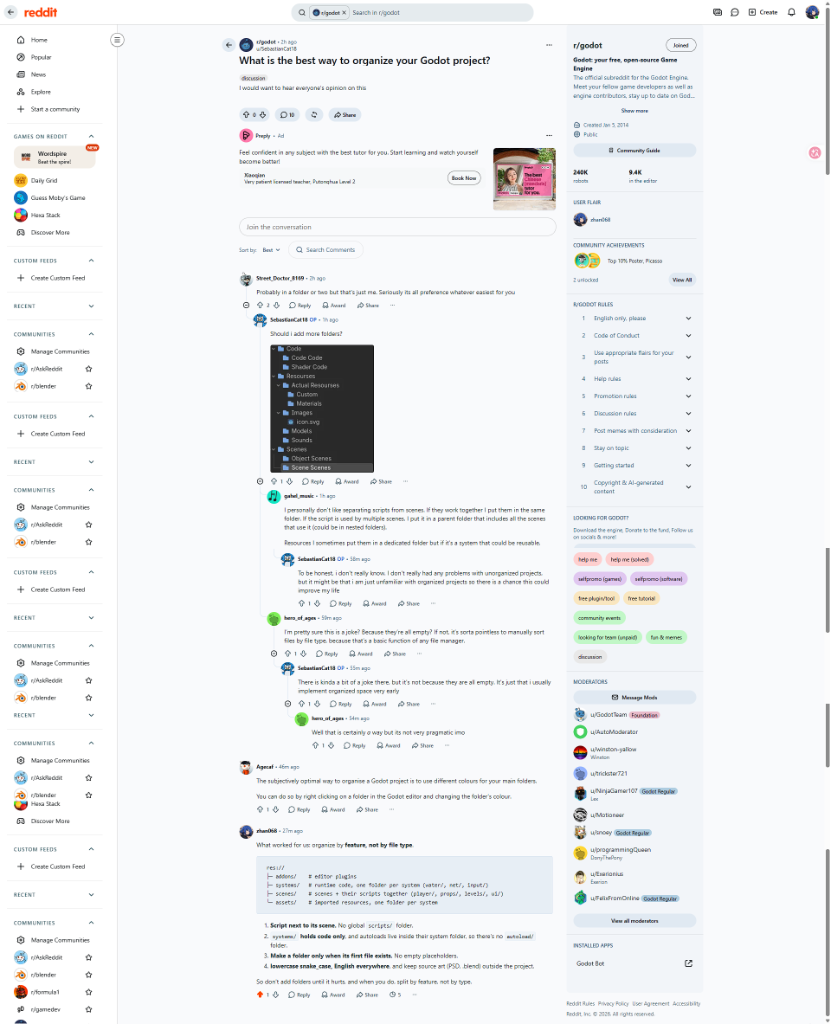
The tree has a certain charm:
- Under
Code:Code CodeandShader Code - Under
Resources:Actual Resources - Under
Images: a singleicon.svg - Under
Scenes:Object ScenesandScene Scenes
Someone in the comments asked if this was a joke since all folders were empty. The OP replied honestly: “It’s not just because they’re empty, I just usually set up the space very early.”
Another person joked: “The best way is just to give folders different colors.”
I left a comment sharing how we handle this on production projects. The thread resonated because almost everyone has done this when starting out: before writing real code, you spend hours setting up neat folders, only for everything to get messy two weeks later.
Why We Rush to Make Empty Folders
You click New Project. Mechanics are undecided, controls aren’t tuned, and the script editor is blank.
Writing gameplay takes mental energy; making folders doesn’t. Hit Enter a few times, make scenes/, scripts/, models/, and audio/, and it feels like the foundation is set.
In practice, categories invented in a vacuum rarely survive three days of development.
On Day 1, you don’t know whether your inventory will be a scene, a custom Resource, or a script attached to the player. Pre-made empty folders just end up as junk drawers.
Problems with Grouping by File Type
Many people sort by file extension:
res://
├── scripts/
│   ├── player.gd
│   ├── enemy.gd
│   └── chest.gd
├── scenes/
│   ├── player.tscn
│   ├── enemy.tscn
│   └── chest.tscn
├── materials/
│   ├── player.tres
│   └── chest.tres
└── audio/
    ├── player_jump.wav
    └── chest_open.wav
It looks organized on paper, but it creates friction during daily work:
You Spend Your Day Scrolling the File Tree
Say you want to tune jump feel:
You open scripts/player.gd for code, scroll down to scenes/player.tscn to adjust node properties, scroll to materials/ for shaders, and scroll to audio/ for jump sounds.
To touch one feature, you keep expanding, collapsing, and scrolling the tree.
It Goes Against Godot’s Scene Design
Godot’s design is “Everything is a Scene”. A .tscn scene combined with the .gd script on its root node is effectively a self-contained class.
The player, a chest, or a dialogue box are independent units. Sticking scripts in a separate global scripts/ folder tears apart things that belong together.
Deleting Features Leaves Orphan Files
Cutting features is routine in game development. If a trap is removed in a type-based project, you have to delete the scene from scenes/, the script from scripts/, the material from materials/, and the sound from audio/.
Miss one file, and it sits forgotten in the repo, inflating build size because nobody knows if it’s safe to delete.
What We Do in Windup Wonderland
In Windup Wonderland (our 4-player co-op physics game), we structured the repository like this:
At the repository root:
D:/WindupWonderland/
├── art_source/   # Blender and PSD source files, kept outside Godot
├── docs/         # GDD and technical design docs
└── src/          # Godot project root (res://)
Blender and Photoshop files stay outside the engine. Only exported .glb and .png files enter src/. This prevents editor reload lag and avoids repository bloat.
Inside Godot’s src/ (res://), there are only four top-level folders:
res://
├── addons/   # Editor plugins
├── systems/  # Headless runtime systems (code only)
├── scenes/   # Scenes with their scripts side-by-side
└── assets/   # Imported textures, audio, and meshes
Here are our operating rules:
Scripts Stay Next to Their Scenes
There is no global scripts/ directory.
In our res://scenes/player/:
res://scenes/player/
├── puppet.tscn              # Player scene
├── puppet.gd                # Main player script
├── puppet_input.gd          # Input buffering
├── puppet_grab.gd           # Grab logic
├── puppet_fling.gd          # Fling mechanics
├── puppet_mount.gd          # Piggyback / mount
├── puppet_slap.gd           # Slap interaction
├── puppet_wind.gd           # Wind-up spring energy
├── puppet_visual.gd         # Visual wobble
├── arm_reach_modifier.gd    # Reach calculations
├── fling_preview.gd         # Trajectory preview
├── player_camera.tscn       # Camera scene
└── player_camera.gd         # Camera damping
Tuning player feel happens in this single folder. Scene on the left, scripts on the right.
The same applies to interactive props in scenes/props/:
res://scenes/props/
├── floor_button.tscn + floor_button.gd     # Floor switch
├── seesaw.tscn + seesaw.gd                 # Seesaw
├── snap_trap.tscn + snap_trap.gd           # Trap
├── spring_pad.tscn + spring_pad.gd         # Bounce pad
├── wall_button.tscn + wall_button.gd       # Wall button
├── floating_crate.tscn                     # Floating crate
└── prop_crate_heavy.tscn                   # Heavy crate
Each prop is self-contained. To duplicate or delete it, you only touch that one spot.
Systems Hold Code Only — No autoload/ Folder
Logic that doesn’t need a scene tree goes into res://systems/:
res://systems/
├── input/
│   ├── player_device.gd       # Controller assignment
│   └── input_glyphs.gd        # Button icon mapping
├── net/
│   ├── net_session.gd         # Session management (Autoload)
│   └── steam_lobby.gd         # Steam lobby state
└── water/
    ├── water_query_service.gd # Water query service
    ├── water_river_runtime.gd # Spline solver
    ├── water_buoyancy_body.gd # Buoyancy physics
    ├── water_sample.gd        # Sampling structs
    └── shaders/               # Shaders
Many projects create an autoload/ folder and drop every singleton in there.
Autoload is just a setting in Project Settings. Our network session is in systems/net/net_session.gd, and in project.godot we point to it directly:
[autoload]

NetSession="*res://systems/net/net_session.gd"
Keep singletons inside the system they belong to.
Large Systems: Three-Tier Vertical Slicing
When a subsystem grows large—like our custom water system—we split it across three layers:
System =
addons/<x>/(Tooling) +systems/<x>/(Runtime code) +assets/<x>/(Data)
- Editor side →
res://addons/ww_water/- Curve editor, gizmos, and baking panel. Runs only in the editor; excluded from exports.
- Runtime logic →
res://systems/water/- Buoyancy physics (
water_buoyancy_body.gd), query service, and shaders. Pure code for live calculations.
- Buoyancy physics (
- Data →
res://assets/water/authored/: Level designers’ source splines.baked/: Baked meshes, flow textures, and metadata.
All three share the same water name. Responsibilities are distinct: tools in addons, math in systems, data in assets.
Only Make a Folder When Its First File Lands
Our rule is straightforward: Make a folder only when its first file exists. No empty placeholders.
Even though we know we will eventually add save games (systems/save/) and volumetric clouds (systems/sky/), we do not create those folders until code is written.
Keep things flat while they’re small. Only split folders when finding files becomes tedious, and when you do split, split by feature, not by file type.
Summary
Wanting clean folder trees when starting a project is natural.
But folders are tool racks, not display cases. Wrenches belong next to the bolts they turn, and broken parts should be easy to throw out in one piece.
Don’t rush to build structure upfront. Let folders split naturally as features grow.
Everyone knows that “premature optimization is the root of all evil”. In game development, we can add the second half: “premature categorization is the root of all chaos”.
Technical Discussion & Comments